Resident Evil Requiem Best Settings: Mid-Range PC Optimization Guide (2026)
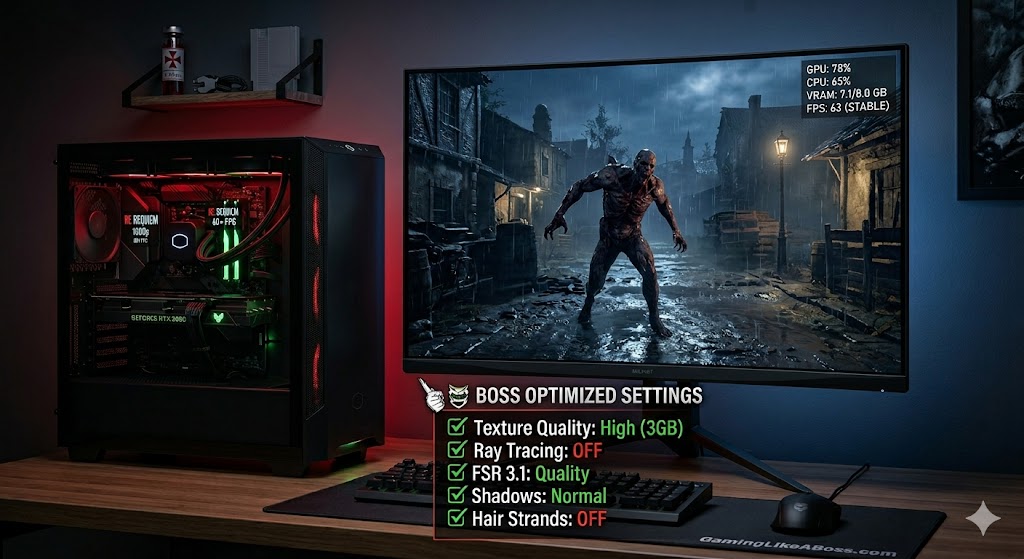
Capcom has officially dropped Resident Evil: Requiem (RE9), and while it’s a visual masterpiece, it can turn your mid-range PC into a space heater if you aren’t careful.
If you’re rocking a setup like an RTX 3060, RTX 4060, or RX 6600, you don’t have to settle for “Potato Mode.” You can get a solid 60+ FPS at 1080p (or even 1440p) while keeping the game looking terrifyingly realistic.
Here is the “Boss” guide to the best settings for Resident Evil Requiem.
1. The VRAM Trap: Watch Your Textures
Most mid-range cards today have 8GB of VRAM. Requiem is hungry for memory.
- Texture Quality: Set this to “High (2GB or 3GB)”. Going to “Ultra” or “Maximum” will cause massive micro-stutters as your VRAM overflows.
- Shadow Quality: Keep this at “Normal” or “High”. The “Maximum” setting adds a huge VRAM tax for very little visual gain during gameplay.
2. The Performance Killers (Turn These OFF)
These three settings are the biggest FPS hogs. If you want a smooth experience, disable these first:
- Ray Tracing: Just turn it off. On mid-range hardware, the performance hit (30-40%) isn’t worth the slightly better reflections, especially in a dark horror game where you’re moving fast.
- Hair Strands: This makes character hair look great in cutscenes but eats about 5% of your FPS and adds a full 1GB to your VRAM usage. Unless you’re a hair stylist, leave it off.
- Mesh Quality: This controls how much detail is on character models. Setting this to “Standard” or “Low” prevents frame drops when multiple enemies crowd the screen.
3. The Secret Weapon: DLSS and FSR 3.1
Capcom’s implementation of upscaling in Requiem is top-tier.
- Upscaling: If you have an Nvidia card, use DLSS (Quality). If you’re on AMD, use FSR 3.1 (Quality).
- Frame Generation: If your card supports it (RTX 40-series or via FSR 3 on others), turn it on! It can literally double your perceived frame rate, making those boss fights feel buttery smooth.
The “Boss” Optimized Settings Cheat Sheet
| Setting | Recommended Value | Why? |
| Screen Resolution | 1920×1080 / 2560×1440 | Native for most mid-range monitors. |
| Frame Rate | Variable / 60 FPS Cap | Prevents overheating and stuttering. |
| Anti-aliasing | TAA | Best balance for upscalers. |
| Texture Filter | High (ANISO x4) | Low impact, keeps floors looking sharp. |
| Screen Space Reflections | ON | Essential for the “horror” look; only turn off if desperate. |
| Volumetric Fog | Normal | High is too taxing; Low looks “blocky.” |
| Ambient Occlusion | FidelityFX CACAO | Better performance than HDAO. |
Technical Tip: The “First 15 Minutes” Rule
As a hardware fixer, I’ve noticed a lot of people panic during the opening scene of Requiem. The starting area features a heavy rainstorm and a massive map that is excessively taxing on your CPU and GPU.
Boss Advice: Don’t judge your entire performance on the first 15 minutes. Once you get inside the first building, your FPS will likely jump by 15-20%. Tune your settings based on the indoor sections for the best overall experience.
Conclusion
Resident Evil Requiem is one of the best-optimized games of 2026—as long as you don’t get greedy with Ray Tracing. Use DLSS/FSR, keep your textures at a sensible level, and you’ll be popping zombie heads at a smooth 60 FPS.
Are you playing on a mid-range rig? Let me know your specs and what FPS you’re getting in the comments!
Resident Evil Requiem Best Settings: PC Optimization Guide (2026)





Post Comment